Ever had that moment where your smart home lighting just refuses to turn on, leaving your room in darkness and your patience in the dust? I’ve been there too. One night, I spent hours trying to troubleshoot a stubborn smart bulb, only to realize I overlooked a simple connection issue that was causing all the fuss. It’s frustrating, isn’t it? Especially when you’re excited to upgrade your home, only to face unexpected hiccups that seem to come out of nowhere.
Why Smart Lighting Problems Can Drive You Crazy
Smart lighting systems promise convenience and modern flair, but they can quickly turn into a headache if not installed or maintained correctly. From flickering bulbs to unresponsive switches, these issues often stem from overlooked details or beginner mistakes. Early on, I made a critical error—ignoring the importance of proper wiring connections—which led to intermittent outages and constant troubleshooting. Trust me, that mistake cost me time and energy I could have spent enjoying my smart setup.
Today, I want to share proven tips that will help you troubleshoot smart lighting issues efficiently and safely. Whether you’re installing new smart bulbs or fixing existing ones, these insights will help you avoid common pitfalls and ensure your lighting system is both reliable and safe. After all, a well-installed lighting system can transform your home into a cozy, energy-efficient haven. Ready to cut through the confusion and get your smart lighting working flawlessly? Let’s dive in.
Is Smart Lighting Really Worth the Hype
I used to think all the fuss about smart lighting was just marketing hype—until I experienced the convenience firsthand. However, I learned the hard way that poor installation can negate those benefits. One mistake I made early on was neglecting to check the compatibility of my switches and bulbs, which caused more trouble than it was worth. This is a common mistake, but one that can be easily avoided with a little guidance. For more expert tips on troubleshooting, check out this detailed guide.
Understanding the basics of proper wiring and connection safety is crucial. Remember, electricity is powerful and dangerous if mishandled. If you’re ever in doubt, don’t hesitate to contact a professional—safety should always come first. You can reach out to trusted electricians through this contact page for personalized assistance.
Now, with that foundation set, we’re ready to look at specific steps you can take to troubleshoot your smart lighting system effectively. From checking wiring to optimizing your app settings, these tips will help you get back to enjoying a beautifully lit home—without the stress.
Check Your Wiring Connections Before Powering Up
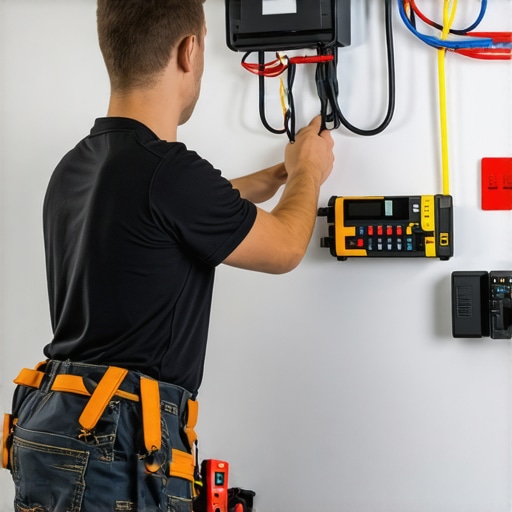
When I first installed my smart bulb, I skipped double-checking the wiring, thinking I could fix it later. Turns out, a loose wire caused flickering. So, I shut everything down, carefully removed the switch cover, and verified each wire was tightly secured—especially the ground and live wires. Use a voltage tester to confirm power is off before touching any wires. Proper wiring is the foundation; if you’re unsure, consult an electrician or reference this step-by-step guide for safe installation practices.
Test the Power Supply and Circuit Breakers
Sometimes, the issue isn’t the bulb but the circuit itself. I had a problem where my smart light wouldn’t respond, and after checking the wiring, I realized the breaker had tripped. Reset the breaker and ensure the circuit is live. Use a multimeter to verify voltage at the socket or switch. This step prevents wasting time on faulty devices. If you find consistent breaker trips, it might indicate an overload or wiring fault—consider consulting an electrician for a thorough diagnosis.
Assess the Compatibility of Your Devices
In my case, I bought a new smart bulb that wasn’t compatible with my existing hub. Compatibility issues are common; ensure your smart bulbs, switches, and hubs all support the same protocols. Check the specifications on the manufacturer’s site, or better yet, read reviews from users with a similar setup. For complex setups, consider professional help by visiting this troubleshooting resource.
Reset and Reconfigure Your Smart Devices
If the wiring and power supply are okay, the device might need a reset. I usually perform a factory reset by turning the bulb off and on multiple times or pressing a reset button. Afterward, reconnect it to your app following the manufacturer’s instructions. Sometimes, a simple reconfiguration fixes connectivity hiccups. If issues persist, review this detailed troubleshooting process which walks you through network and device settings.
Update Firmware and App Settings
Outdated firmware can cause unresponsiveness. Check your app for updates, and apply any available firmware patches. Also, verify your Wi-Fi connection—poor signal strength can lead to delays or failures. I recommend placing your router closer or using a Wi-Fi extender if needed. For optimal performance, consult this expert advice on maintaining your smart home devices.
Inspect Physical Condition of Bulbs and Switches
Physical damage or dirt can interfere with connections. I once had flickering because the bulb’s contacts were dirty. Remove the bulb, clean the contacts gently with a dry cloth, and reinstall. Also, check the switch itself—if it’s old or loose, replace or tighten it. Remember, safety first—disconnect power before doing any physical inspection or repairs. For detailed switch replacement tips, see this guide.
When To Call a Professional
If after these steps the problem remains, it’s time to contact a licensed electrician. Electrical issues can be dangerous, and professional troubleshooting ensures safety and a reliable fix. You can reach trusted electricians via this contact page. Remember, attempting complex repairs without proper knowledge can lead to hazards or further damage.
Many homeowners believe that troubleshooting smart lighting is straightforward, but the reality is far more nuanced. A common myth is that smart bulbs are inherently unreliable, leading many to blame the device rather than the setup. In my experience, what most people get wrong is overlooking the importance of understanding the underlying electrical and network intricacies that influence performance. For instance, a frequent mistake is assuming firmware updates alone will fix connectivity issues, but the real culprit often lies in wiring inconsistencies or incompatible protocols, which are harder to diagnose without a detailed inspection.
Make no mistake: smart lighting systems are complex ecosystems that require careful integration. One advanced mistake I’ve seen is users attempting to troubleshoot via trial and error without understanding the protocol differences—Zigbee, Z-Wave, Wi-Fi—that govern device communication. Misalignment here causes persistent unresponsiveness, which many interpret as device failure. Experts suggest that a thorough understanding of these nuances can save hours of frustration and prevent unnecessary replacements.
Have you ever fallen into this trap? Let me know in the comments.
Why does resetting a device sometimes not solve persistent issues?
Resetting is often the first step, but it can be a trap if you don’t address the root cause. For example, a device reset won’t fix wiring faults or router configuration problems. According to industry experts, many persistent issues stem from deeper electrical or network setup flaws, not the device itself. Therefore, before resetting, ensure your wiring is solid, your circuit breakers are stable, and your Wi-Fi network is optimized. For comprehensive guidance, check out this electrician’s guide.
Understanding these hidden nuances can be a game-changer. It helps you avoid the common trap of blaming hardware when the real problem is often in the wiring or network setup. Remember, a holistic approach to troubleshooting ensures reliability, safety, and long-term satisfaction with your smart home lighting system.
Keeping your smart lighting system working flawlessly over time requires more than just initial installation; it demands the right tools, regular maintenance, and an understanding of best practices. In my experience, investing in quality equipment and following structured routines can dramatically reduce troubleshooting time and extend the lifespan of your setup.
Use a Multimeter for Precise Troubleshooting
A high-quality multimeter is essential for verifying voltage levels and electrical continuity. I personally rely on a digital multimeter like the Fluke 115 because it offers accurate readings and durability. Regularly checking your wiring connections with a multimeter helps identify loose wires or faulty circuits before they cause system failures. For instance, if your smart bulbs flicker intermittently, testing the voltage at the socket can reveal if the circuit is unstable, preventing unnecessary replacements.
Maintain Firmware and App Updates Promptly
Manufacturers frequently release firmware updates that fix bugs and improve compatibility. I make it a habit to check for updates weekly, ensuring my smart devices operate with the latest features and security patches. This proactive approach reduces connectivity issues and enhances overall reliability. Most systems notify you when an update is available, but manually verifying through your app is a good habit. For example, updating your smart hub firmware can improve communication protocols, minimizing unresponsiveness issues.
Implement Routine Physical Inspections
Physical inspections are often overlooked but are crucial for long-term performance. I inspect my switches and bulbs quarterly, cleaning contacts and tightening loose connections. Dust or dirt on contacts can cause flickering or intermittent response. Additionally, replacing aging switches or damaged wiring before it becomes a hazard ensures safety and system stability. Always disconnect power before inspection—safety first!
Optimize Network Conditions for Reliability
Since many smart lighting issues stem from network instability, I recommend using Wi-Fi analyzers like NetSpot or Ekahau to monitor signal strength and identify dead zones. Ensuring your router is positioned centrally and utilizing mesh extenders if necessary can dramatically improve response times. A stable network minimizes delays and disconnects, which are common causes of frustration with smart lighting systems. Regularly rebooting your router can also clear temporary glitches that disrupt device communication.
Plan for Future Scalability
As your smart home grows, so should your tools and infrastructure. I’ve started exploring professional-grade hubs that support multiple protocols (Zigbee, Z-Wave, Wi-Fi) to future-proof my setup. These hubs simplify management and improve reliability when adding new devices. Additionally, investing in surge protectors for your smart devices protects against power surges, extending their lifespan. With smart homes becoming more complex, scalable solutions and protective measures are key.
How do I maintain my smart lighting system over time?
Maintaining your smart lighting system involves regular firmware updates, physical inspections, network optimization, and using precise troubleshooting tools like a multimeter. These steps help identify issues early, prevent failures, and ensure long-term reliability. As technology advances, I predict that integration with AI-driven diagnostics will become standard, making maintenance even easier. For now, staying proactive and investing in reliable tools is your best strategy. Try setting a weekly routine to check your connections and update your devices—small efforts that yield significant benefits. For more detailed guidance, visit this expert troubleshooting resource.
The Hardest Lesson I Learned About Smart Lighting Troubleshooting
One of the toughest lessons I faced was realizing that most smart lighting issues aren’t just about faulty devices—they often stem from wiring or network missteps that beginners overlook. I spent hours replacing bulbs and resetting apps before understanding that the root cause was a loose wire connection, which only a careful inspection revealed. It taught me the importance of trusting your multimeter and inspecting physical connections before jumping to conclusions.
How Compatibility Can Make or Break Your Smart Home
Early in my journey, I bought a smart bulb that wasn’t compatible with my existing hub, leading to persistent connectivity problems. It was frustrating, but I learned that verifying protocol support (Zigbee, Z-Wave, Wi-Fi) is crucial. Don’t assume devices will work seamlessly together—do your research or consult trusted sources like this electrician’s guide for compatibility tips.
The Hidden Power of Proper Wiring and Power Supply
One of my biggest breakthroughs was understanding that a tripped circuit breaker or a loose wire can cause flickering even if the device itself is fine. Using a multimeter to verify voltage at the socket saved me from unnecessary replacements. If your smart lighting isn’t responding, check your power supply first—sometimes, the simplest fix is the most overlooked.
What Experts Keep Under Their Hat About Troubleshooting
Many professional electricians swear by detailed wiring inspections and network diagnostics before resetting devices. Resetting a smart bulb or switch can be a quick fix, but it often doesn’t address underlying wiring or network issues. Learning to interpret voltage readings and signal strength can save you hours of guesswork and frustration.
Never Underestimate Routine Maintenance
Regularly cleaning contacts, tightening loose switches, and updating firmware can dramatically improve reliability. I schedule quarterly check-ins to ensure my system runs smoothly. Investing in tools like a quality multimeter and Wi-Fi analyzers can make troubleshooting more precise, ensuring your smart lighting stays bright and reliable for years to come.
This post really resonated with me, especially the part about checking wiring before jumping to device resets. I once struggled for days because I thought my smart bulbs were faulty, but it turned out to be a loose connection behind the switch. Using a multimeter to verify voltage helped me find that simple issue—a reminder that proper electrical checks are so underrated in troubleshooting smart home gear. I also found that keeping firmware updated can prevent many connectivity hiccups. In your experience, how often do you recommend physically inspecting and cleaning contacts to avoid flickering or response issues? I’ve been trying to develop a routine because I’ve noticed that dust buildup on contacts sometimes causes intermittent flickering. Would love to hear others’ tips on regular maintenance or other preventative measures that work for them! Honestly, investing in the right tools made a huge difference for me, especially a reliable multimeter and Wi-Fi analyzers for network troubleshooting. It’s surprising how many issues stem from power supply inconsistencies or weak Wi-Fi signals. How do others in the community handle the balance between troubleshooting tech versus electrical issues?
This post hits home! I remember spending hours trying to get my smart bulbs to work properly only to find out that my wiring behind the switch was a loose connection. Once I got a multimeter to verify the voltage and resecured the wires, everything became smooth sailing. It’s a simple step but often overlooked, especially by newcomers. Regularly inspecting connections and cleaning contacts has made a huge difference for me, especially since I noticed flickering was often caused by dirty contacts. I wonder how frequently others tend to check their wiring—monthly, quarterly? Also, does anyone have tips for quickly diagnosing whether the problem is electrical or network-related without extensive troubleshooting? I’ve found that sometimes, just resetting the device doesn’t solve underlying issues and requires a good physical inspection first. Would love to hear how the community manages routine maintenance and troubleshooting to keep their smart lighting reliable long-term.